
Download SafetySync – Online Health & Safety Management Tool
Overview
SafetySync is a cloud‑based health and safety platform designed to replace paper‑heavy manuals, endless meetings, and manual tracking with a streamlined, secure web portal. The service lets managers upload or select from preset safety practices, assign relevant courses, videos, and training modules to each employee, and automatically monitor completion rates. Workers receive an email invitation, log in at any time, and work through the material at their own pace, while the system sends automated reminders to keep everyone on schedule.
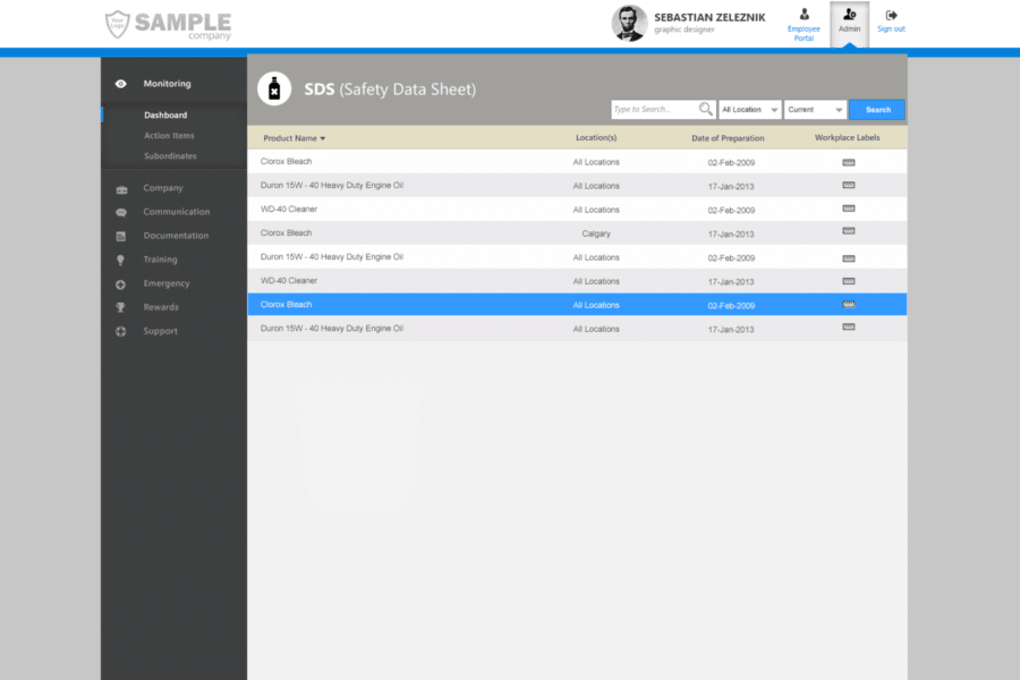
A built‑in reporting dashboard gives managers instant visibility into who has finished training, who is overdue, and where additional support may be required. Incentive programs and digital certificates can be added to motivate staff and recognise achievement. After a free trial, SafetySync operates on a flat‑fee‑per‑user model that includes expert advice and regular software updates, ensuring the platform stays compliant with evolving regulations.
The interface is clean, intuitive, and mobile‑responsive, meaning employees on Windows, macOS, Android, or iOS can access the same content without extra installations. By centralising safety information in one secure location, SafetySync not only saves time but also reduces the risk of non‑compliance penalties, making it a practical investment for any size of workplace—from construction sites to corporate offices.
Key Features and Benefits
- Course Assignment Engine: Create custom safety courses or choose from industry‑standard templates, then automatically assign them based on job role, location, or certification level.
- Progress Tracking Dashboard: Real‑time visual analytics show completion percentages, overdue tasks, and individual performance metrics.
- Automated Email & SMS Reminders: Schedule reminders to keep learners on track without manual follow‑up.
- Digital Certificates & Badges: Issue verifiable certificates instantly upon successful completion, supporting incentive programs.
- Secure Cloud Storage: All documents, videos, and quiz data are stored on encrypted servers, meeting GDPR and ISO‑27001 standards.
- Mobile‑Responsive Design: Workers can complete training on desktops, tablets, or smartphones, ensuring flexibility for field staff.
- Multi‑Language Support: Interface and course content can be presented in multiple languages, ideal for global teams.
- Expert Consultation: Subscription includes access to safety consultants who can help tailor content to specific regulatory requirements.
- Integration Capabilities: Connect SafetySync with HRIS, LMS, or ERP systems via API for seamless data flow.
- Scalable Pricing Model: Flat fee per user eliminates surprise costs and scales effortlessly as your workforce grows.
Each of these features is built to minimise administrative overhead while maximising compliance confidence. For example, the automated reminder engine eliminates the need for managers to chase down overdue training manually, freeing up valuable time for operational tasks. The progress dashboard provides a single source of truth for auditors, reducing the paperwork typically required during inspections. Moreover, the ability to issue digital certificates instantly shortens the lag between learning and recognition, which research shows improves knowledge retention and employee morale. SafetySync’s secure cloud architecture guarantees that sensitive safety documentation remains protected, while its mobile‑first design ensures that workers on construction sites, manufacturing floors, or remote offices can stay up‑to‑date without returning to a desktop.
Installation, Setup & Compatibility
Getting started with SafetySync is intentionally straightforward. After creating a free trial account on the official website, you’ll be prompted to verify your business email and set a strong password. No software download is required because SafetySync runs entirely in the browser; simply log in from any modern browser (Chrome, Firefox, Edge, Safari) on a Windows 10/11, macOS 10.15+, Android 8+, or iOS 13+ device. For organisations that prefer a dedicated desktop shortcut, a lightweight Progressive Web App (PWA) can be installed with one click, providing offline‑ready icons while still syncing data when a connection is re‑established.
The initial setup wizard walks you through three key steps: (1) Upload existing safety manuals, policies, and videos, or select from the built‑in library of industry‑approved modules; (2) Define user groups based on job function, location, or risk level; and (3) Assign the appropriate courses to each group. Users are invited via a personalised email containing a secure link that automatically creates their account on first login. Once inside the portal, employees see a clean “My Training” dashboard that lists pending modules, upcoming deadlines, and earned certificates.
SafetySync’s cross‑platform compatibility ensures that all features—course assignment, progress tracking, reporting, and communication—function identically whether accessed from a corporate laptop, a field tablet, or a personal smartphone. The platform also supports Single Sign‑On (SSO) via SAML 2.0, allowing seamless integration with Azure AD, Okta, or Google Workspace for enterprises that manage authentication centrally. Updates are rolled out automatically on the server side, so users always benefit from the latest security patches and feature enhancements without any manual intervention.
Pros, Cons, FAQ & Final Verdict
Pros
- Fully cloud‑based – no local installation or maintenance.
- Intuitive UI that requires minimal training for administrators.
- Robust reporting tools for compliance audits.
- Automated reminders and certificate issuance boost completion rates.
- Scalable pricing model suitable for small businesses to large enterprises.
Cons
- Relies on internet connectivity; offline access is limited to PWA cache.
- Custom content creation may require design time if you don’t use presets.
- Advanced API integration is available only on higher‑tier plans.
Frequently Asked Questions
Is SafetySync compliant with GDPR and other data protection regulations?
Yes. All data is stored on encrypted servers located in EU‑compliant data centres, and the platform provides tools for data export, deletion, and consent management to meet GDPR requirements.
Can I integrate SafetySync with my existing HR system?
SafetySync offers a RESTful API and native SAML SSO, allowing seamless integration with most HRIS and LMS platforms. Integration support is included in the Enterprise tier.
How does the pricing structure work after the free trial?
After the 30‑day trial, SafetySync charges a flat monthly fee per active user. Volume discounts apply for organisations with more than 200 users, and annual billing offers an additional 10 % discount.
What types of training content can I upload?
You can upload PDFs, Word documents, PowerPoint slides, video files (MP4, AVI), and SCORM‑compatible e‑learning modules. The platform automatically converts most formats for browser playback.
Is there customer support available?
Yes. All paid plans include 24/7 email support, a live chat option during business hours, and access to a knowledge base. Enterprise customers receive a dedicated account manager.
Conclusion & Call to Action
SafetySync delivers a modern, secure, and highly automated solution for workplace health and safety training. Its blend of easy‑to‑use course management, real‑time compliance reporting, and mobile accessibility makes it a compelling choice for any organisation looking to eliminate the inefficiencies of paper‑based safety programs. While internet connectivity is a prerequisite, the benefits of reduced administrative overhead, higher training completion rates, and audit‑ready documentation far outweigh this minor limitation. If you’re ready to streamline your safety training, improve compliance, and empower employees to learn at their own pace, download SafetySync today and start your free trial.
SafetySync stands out for its intuitive design and powerful automation features. The platform’s ability to track progress in real time and send automated reminders significantly reduces manual follow‑up. The only drawback is the reliance on a stable internet connection, but this is a common trade‑off for cloud‑based SaaS tools. Overall, it’s an excellent investment for businesses that prioritize safety compliance.



.png)



